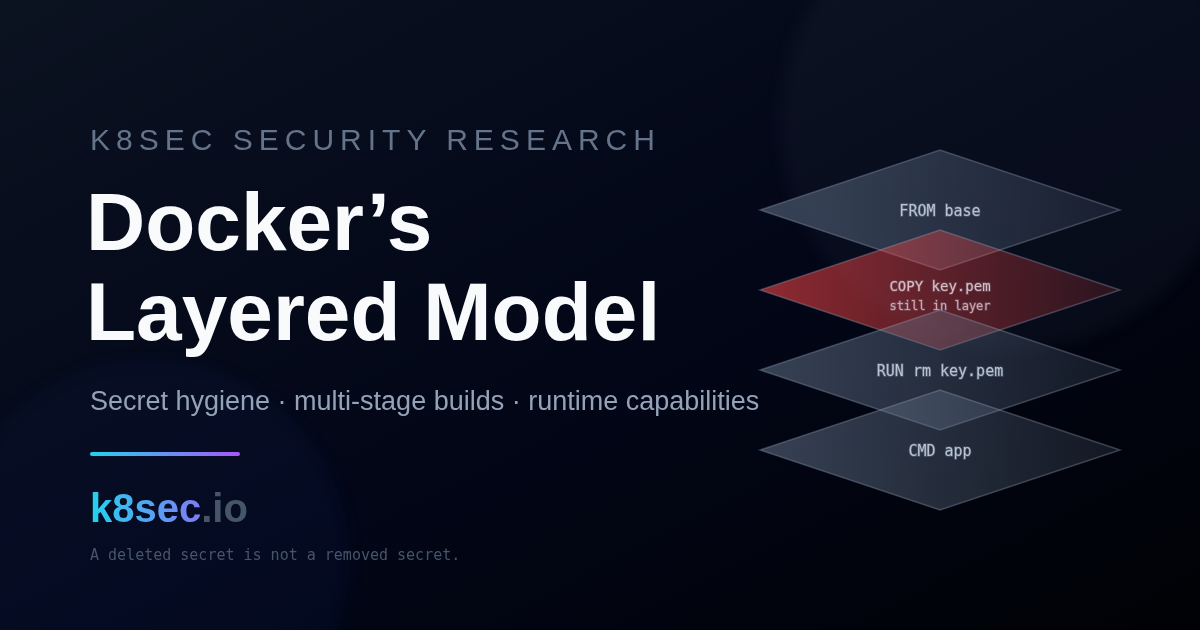
01The layer stack is append-only
An image is an ordered set of read-only layers. Every FROM, COPY, ADD and RUN that touches the filesystem produces one new layer that records only its diff against the layers below. At runtime the container adds a single thin writable layer on top. The storage driver (overlay2 on modern Docker) stacks these with a union mount and copy-on-write.
The consequence that breaks secret handling: a layer is immutable once written. When a later instruction deletes a file, the union filesystem records a whiteout entry — a marker (.wh.<name> in the overlay backing store) that hides the path in the merged view. The original bytes stay in the earlier layer, fully intact. Anyone who can pull the image can read them: docker save, docker history, or extracting the layer tarballs recovers every “deleted” file.
| Model | Ordered read-only layers + one writable container layer (union / copy-on-write) |
| Default driver | overlay2 (lowerdir = image layers, upperdir = container writes) |
| Deletion | Whiteout marker in a later layer — hides, does not remove |
| Boundary | Layer 4 (Image) → Layer 5 (Container) → Layer 3 (Host) when capabilities allow |
| Recoverable by | Any image puller: docker save, layer extraction, docker history --no-trunc |
02A deleted secret is not a removed secret
The most common leak is a two-instruction pattern: copy a secret in, use it, delete it. Because COPY and RUN are separate layers, the secret is preserved whole in the COPY layer no matter what the next line does.
# Dockerfile
FROM node:20-slim
COPY id_rsa /root/.ssh/id_rsa          # layer writes the private key
RUN npm ci && rm -f /root/.ssh/id_rsa  # whiteout only; key stays in the COPY layer

# Any puller recovers it:
docker pull registry.example/app:1.4
docker save registry.example/app:1.4 -o app.tar
mkdir out && tar -xf app.tar -C out
find out -name '*.tar' -exec tar -tf {} \; | grep -i 'ssh/id_rsa'   # present
Build-time ARG and ENV add two more channels that survive independently of any file. ARG values are recorded in the image build metadata and printed by docker history; ENV values are written into the image config and are present in the environment of every later layer and the running container.
ARG NPM_TOKEN used in a RUN appears in docker history --no-trunc and the image manifest metadata.ENV AWS_SECRET_ACCESS_KEY=... is stored in the image config JSON and exported into the process environment forever.RUN curl -u user:pass ... && rm creds can leave the secret in a build-cache mount or a written temp file inside that layer.Does the secret disappear? A quick reference
The verdict depends entirely on where the secret lands. Anything that writes it to a layer or the image config is permanent; only never-writing it keeps it out.
| What you do | Does the secret disappear from the image? |
|---|---|
RUN rm secret.txt | No — the file stays in the previous layer; the delete is only a whiteout. |
ENV SECRET= (overwrite or unset later) | No — the original value is recorded in the image config and build history. |
ARG instead of ENV | Partially — not in the container environment, but still visible in docker history. |
BuildKit --mount=type=secret | Yes — never written to any layer or to history. |
| Runtime injection via a secrets manager | Yes — never in the image at all; it arrives only in the running container. |
--squash | Depends — merges intermediate layers, but the secret existed during the build and survives whenever a surviving step still needs it. |
03Certificates, keys and the “just squash it” trap
TLS private keys, CA bundles with client certs, kubeconfig files and cloud credential files are the same problem class as SSH keys: written in one layer, hidden in another, recoverable from the image. A private key is worse than a password because rotation usually means reissuing a certificate, not editing a secret store.
A frequent “fix” is to collapse the image with docker build --squash or an external squash tool. This does not solve the problem. Squashing merges layers into one; if the secret was written and deleted within the squashed range, the whiteout wins and the file is gone — but if the secret is needed by any surviving instruction, or the delete lands in a layer outside the squash, the bytes remain. Squash also discards layer cache and hides provenance, so it trades a security non-fix for slower, less auditable builds.
# Human-readable build steps, including ARG values and env
docker history --no-trunc --format '{{.CreatedBy}}' registry.example/app:1.4

# Config JSON: look at .config.Env and .history for baked secrets
docker inspect registry.example/app:1.4 --format '{{json .Config.Env}}'

# Full layer scan for secret material (Trivy, offline DB refresh separate)
trivy image --scanners secret --severity HIGH,CRITICAL registry.example/app:1.404Multi-stage builds and BuildKit secret mounts
The correct model keeps build-time material out of the shipped layers entirely. Two mechanisms do this: multi-stage builds for build dependencies and artifacts, and BuildKit secret mounts for credentials.
Multi-stage: ship artifacts, not the toolchain
A builder stage compiles or installs with whatever it needs. The final stage starts from a clean, minimal base and copies only the finished artifact with COPY --from=builder. The builder’s layers — compilers, caches, and any secret it touched — are never part of the final image.
# syntax=docker/dockerfile:1.7
FROM golang:1.23 AS builder
WORKDIR /src
COPY go.mod go.sum ./
RUN go mod download
COPY . .
# private module auth via a secret mount: never written to a layer
RUN --mount=type=secret,id=gitcreds,target=/root/.netrc \
    CGO_ENABLED=0 go build -o /out/app ./cmd/app

# final stage: distroless, non-root, no shell, no build toolchain
FROM gcr.io/distroless/static-debian12:nonroot
COPY --from=builder /out/app /app
USER 65532:65532
ENTRYPOINT ["/app"]
BuildKit secret mounts: credentials with no layer footprint
RUN --mount=type=secret,id=... exposes a secret file to a single build step only. It is bind-mounted for the duration of that RUN, never committed to a layer, and never recorded in docker history. The secret is supplied on the build command line from an external source.
# BuildKit is default in modern Docker; forced here for older engines
DOCKER_BUILDKIT=1 docker build \
  --secret id=gitcreds,src="$HOME/.netrc" \
  --secret id=npmtoken,env=NPM_TOKEN \
  -t registry.example/app:1.5 .

# Verify the result carries no secret and no build toolchain
trivy image --scanners secret registry.example/app:1.5
docker history --no-trunc registry.example/app:1.5 | grep -i -E 'netrc|token' || echo "clean"
Finally, keep the build context itself clean. A .dockerignore stops local secrets and history from being sent to the daemon, where a stray COPY . . would otherwise capture them.
# .dockerignore
.git
.env
.env.*
*.pem
*.key
id_rsa
id_rsa.*
**/kubeconfig
.aws
.npmrc05From image to host: runtime capabilities
A clean image is only half the boundary. What the container is allowed to do is decided at docker run by its Linux capability set, namespaces and device access. Docker drops most capabilities by default and keeps a bounded set (about fourteen, including CHOWN, SETUID, NET_BIND_SERVICE). Trouble starts when an operator adds capabilities back — or runs --privileged, which grants the full set, all devices and an unconfined profile.
| Capability / flag | What it grants | Escape relevance |
|---|---|---|
--privileged | All capabilities, all host devices, unconfined seccomp/AppArmor | Direct: mount host disk, load kernel modules, write host files |
SYS_ADMIN | Mount, cgroup, namespace administration | High: cgroup release_agent abuse, mounting host paths |
SYS_MODULE | Load/unload kernel modules | Critical: a loaded module runs as the host kernel |
SYS_PTRACE + hostPID | Trace and inject into processes | High: inject into a host process sharing the PID namespace |
DAC_READ_SEARCH | Bypass file read permission checks | Medium: read arbitrary host files via open_by_handle_at (Shocker-class) |
NET_RAW | Raw sockets | Medium: ARP/DNS spoofing against neighbours on the same bridge |
mounted /var/run/docker.sock | Full control of the Docker daemon | Critical: create a new privileged container mounting / |
Two runtime-boundary CVEs show why the container-to-host layer is not theoretical. CVE-2019-5736 let a malicious container overwrite the host runc binary and gain root on the next exec. CVE-2024-21626 (“Leaky Vessels”) used a leaked file descriptor to reach the host filesystem during build or run. A baked secret plus an over-capable runtime is the full chain from image to infrastructure.
--privileged or added SYS_ADMIN.Image layers
COPY/ADD secret → whiteout delete → recoverable from pulled layers. ARG in history, ENV in config. Verify with docker save, docker history, secret scanners.
Build context
Local .git, .env, key files → COPY . . → captured into a layer. Verify with .dockerignore review and context listing.
Runtime capabilities
Added capability or --privileged → cgroup/mount/module abuse → host root. Verify with effective-caps and privileged-flag inspection at admission and on the node.
Daemon socket
Mounted docker.sock → create privileged sibling → host /. Verify with volume-mount policy and socket-access audit.
06Detecting layer leaks and capability abuse
Detection splits into build-time (does the image carry a secret or a toolchain it should not?) and run-time (is a container running with more power than its workload needs?).
trivy image --scanners secret or grepping extracted layer tarballs. Confidence: high..Config.Env or docker history. Confidence: high.CapEff exceeds the default set, or the Privileged flag set true. Confidence: high./var/run/docker.sock or the host / bind-mounted into a workload container. Confidence: high.Read the effective capability set of a running container directly from the kernel — this is ground truth, independent of what the manifest claims.
# Host PID of the container init, then decode CapEff
pid="$(docker inspect --format '{{.State.Pid}}' web)"
capeff="$(grep '^CapEff:' "/proc/$pid/status" | awk '{print $2}')"
printf 'CapEff=%s\n' "$capeff"
capsh --decode="0x$capeff"

# Flag any running container that is privileged or adds capabilities
docker ps -q | while read -r id; do
  priv="$(docker inspect --format '{{.HostConfig.Privileged}}' "$id")"
  adds="$(docker inspect --format '{{json .HostConfig.CapAdd}}' "$id")"
  [ "$priv" = "true" ] && printf '%s PRIVILEGED\n' "$id"
  [ "$adds" != "null" ] && printf '%s CapAdd=%s\n' "$id" "$adds"
done- rule: Privileged or docker.sock container started
desc: A container was launched privileged or with the Docker socket mounted
condition: >
container_started and container
and (proc.args contains "--privileged"
or container.privileged=true
or (evt.type=container and
fd.name endswith "docker.sock"))
output: >
Overprivileged container start
(image=%container.image.repository:%container.image.tag
id=%container.id privileged=%container.privileged)
priority: WARNING
tags: [container, cis, mitre_privilege_escalation, T1610, T1611]07Hardening the layered model
Split remediation into stopping the current exposure and preventing recurrence at admission.
Immediate
Rotate every credential ever baked into a pushed image — deletion in a later layer never revoked it. Rebuild affected images with a multi-stage Dockerfile and BuildKit secret mounts. Restart workloads with --cap-drop=ALL and add back only what the process needs.
docker run -d --name web \
  --read-only --tmpfs /tmp:rw,noexec,nosuid \
  --cap-drop=ALL --cap-add=NET_BIND_SERVICE \
  --security-opt no-new-privileges \
  --security-opt seccomp=/etc/docker/seccomp-default.json \
  --pids-limit 256 --memory 512m \
  --user 65532:65532 \
  registry.example/app:1.5
Permanent — block it at admission
In Kubernetes, a Kyverno policy rejects privileged pods and added capabilities before they schedule, so a regression cannot reach a node. Pair it with Pod Security Standards at the restricted level.
apiVersion: kyverno.io/v1
kind: ClusterPolicy
metadata:
  name: block-privileged-and-added-caps
spec:
  validationFailureAction: Enforce   # fail closed
  background: true
  rules:
    - name: no-privileged
      match:
        any: [{ resources: { kinds: ["Pod"] } }]
      validate:
        message: "Privileged containers are not allowed."
        pattern:
          spec:
            =(ephemeralContainers): [ { =(securityContext): { =(privileged): "false" } } ]
            containers:
              - =(securityContext): { =(privileged): "false" }
    - name: drop-all-add-minimal
      match:
        any: [{ resources: { kinds: ["Pod"] } }]
      validate:
        message: "Containers must drop ALL capabilities."
        foreach:
          - list: request.object.spec.containers
            pattern:
              securityContext:
                capabilities:
                  drop: ["ALL"]
Use the checklist below as the review gate before an image ships. It scores itself — anything under full coverage is an open exposure to close.
0 controls verified
08Verification and sources
Every claim here is verifiable against primary documentation and reproducible with the commands above. The layer-persistence behaviour follows from the union-filesystem model; the multi-stage and secret-mount fixes are documented Docker features; the capability risks are described in the kernel capabilities(7) manual and the CIS Docker Benchmark; the runtime CVEs have public advisories.
img="registry.example/app:1.5"
# 1. no secret material in any layer
trivy image --scanners secret --exit-code 1 "$img"
# 2. no credential-shaped env in the config
docker inspect "$img" --format '{{json .Config.Env}}' | grep -Eiq 'token|secret|password|key' \
  && echo "FAIL: secret in env" || echo "OK: env clean"
# 3. no build toolchain left behind
docker history --no-trunc "$img" | grep -Eiq 'go build|npm ci|pip install' \
&& echo "WARN: builder steps in final image" || echo "OK: multi-stage"- Docker docs — multi-stage builds
- Docker docs — build secrets (
--mount=type=secret) - Docker docs — overlay2 storage driver and whiteouts
- Linux manual — capabilities(7)
- CIS Docker Benchmark
- CVE-2019-5736 — runc host binary overwrite
- CVE-2024-21626 — runc “Leaky Vessels” escape
- Related: Docker authorization-bypass analysis
- Related: start securing your pods
A layer never forgets. The single most repeated container mistake is trusting a delete to remove what a copy wrote. The layered model does not work that way, and no amount of squashing changes it. Treat every image as a permanent, public record of every byte any instruction ever wrote — then keep secrets out of instructions entirely, and give the runtime only the capabilities the workload actually needs.
Build hygiene and runtime confinement are one control, not two: a baked credential is only a breach once an over-capable container turns it into node access. Close both ends.
Map the image-to-host boundary in your clusters
K8SEC Agent provides read-only graph intelligence over images, workloads, capabilities and identity so you can see where a baked secret meets an over-privileged runtime. It does not collect Secret values, exec into pods or mutate resources.
Explore KAOS methodology