01The attack surface lives in the base image
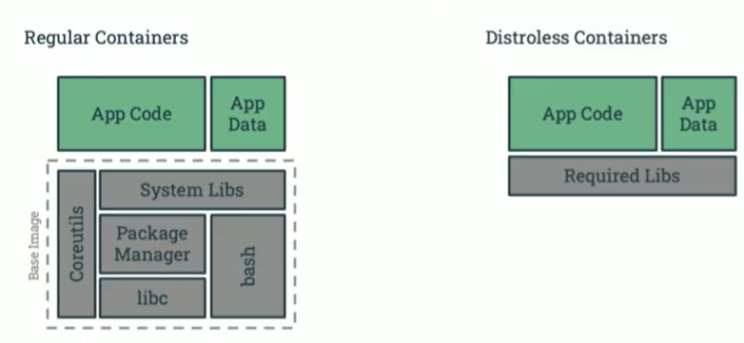
Most of the code in a typical container image was not written by the team that ships it. The base image contributes the C library, TLS stack, shell, coreutils and a package manager — and every one of those packages is a CVE the scanner will report and a tool an attacker can use after a foothold. Shrinking the base image removes both problems at once: fewer packages to patch, and fewer utilities available for post-exploitation.
Choosing a base image: a comparison
The base image fixes the floor of your attack surface. The main minimalist options differ in size, default identity, debuggability and support model:
| Image | Typical size | Default user | What it includes | Primary use | Debuggability | Security benefit |
|---|---|---|---|---|---|---|
scratch | 0 MB | n/a | Nothing | Statically compiled binaries (Go, Rust) | Extremely difficult | Absolute minimum surface; zero base-image CVEs |
| Alpine Linux | ~5–8 MB | root | musl libc, BusyBox shell, apk | General-purpose lightweight containers | Moderate (shell available) | Far smaller surface than a full distribution |
| Distroless | ~2 MB (static) to ~200 MB (with a language runtime) | root, or 65532 with the :nonroot tag | glibc, openssl, CA certs, language runtime | Production runtime for applications | Difficult (no shell) | Removes the utilities attackers use after exploitation |
| UBI Minimal | ~40 MB compressed | root | glibc, microdnf, core RHEL utilities | Enterprise Linux with a small footprint | Moderate (shell available) | Commercially supported, fast patching, stable ABI |
:nonroot distroless variant or set USER explicitly — a minimal image running as UID 0 still hands a foothold root inside the container.Shrink the image
scratch / distroless / Alpine / UBI Minimal base → multi-stage build → slim or unbase_oci to prune what is left. Measure with dive and image size.
Verify the supply chain
Private registry of approved bases → pinned versions → Cosign signature → admission only for signed images.
Scan honestly
Distro-aware scanner → discount backports, build-time and kernel findings → record decisions as VEX → patch the node for kernel CVEs.
Confine the runtime
Non-root, drop ALL capabilities, read-only root, RuntimeDefault seccomp, Secrets Store CSI, mesh authorization, and a unikernel runtime where a VM boundary is required.
Detect and triage
Runtime alerts (exec, shell from interpreter, fileless execution, etcd access) → context questions → true-positive signals → response.
02Distroless and the price of no shell
Distroless images are the strongest general-purpose runtime base, but removing the shell and package manager moves work elsewhere. Four problems come up in every adoption; each has a practical answer.
COPY --from the artifact onto a distroless language base (static, base, cc, java, python3).ldd for a single binary, or slim and unbase_oci (section 03), which resolve dynamic library dependencies automatically.kubectl debug adds an ephemeral container that shares the target’s process namespace.# Ephemeral debug container sharing the app's process namespace
kubectl debug -it pod/web-7d4c9 \
--image=busybox:1.36 \
--target=app \
-- sh
# Inside: inspect the app process without a shell in its own image
ls -l /proc/1/root/app
cat /proc/1/status | grep -E 'Uid|CapEff' 03Minify what you already ship: slim and unbase_oci
Rebuilding every image on a new base takes time. Two tools shrink existing images without changing the application, using opposite strategies.
slim: dynamic analysis
slimtoolkit/slim runs the container, observes which files and libraries the application actually touches, and builds a new image containing only those. The project reports reductions of up to 30x, more for compiled languages. The trade-off is coverage: code paths not exercised during the probe are removed, so drive it with realistic probes and pin anything loaded lazily.
# Run the image, probe its HTTP endpoints, keep only what was used
slim build \
  --target registry.example/web:1.8 \
  --tag registry.example/web:1.8-slim \
  --http-probe=true \
  --include-path /app/templates   # keep lazily loaded files explicitly

docker image ls registry.example/web
unbase_oci: static analysis against the base
unbase_oci from the Garden Linux project needs no running container. It compares the application image with the base image it was built on, keeps every file the application layers added or modified, resolves their dynamic library dependencies, and prunes the rest of the base. A wrapper script moves images in and out of Podman as OCI archives and runs the analysis in its own container:
# -l auto: detect the base image automatically from the image's layers
./unbase_oci -l auto podman:demo :unbased

podman image ls | grep demo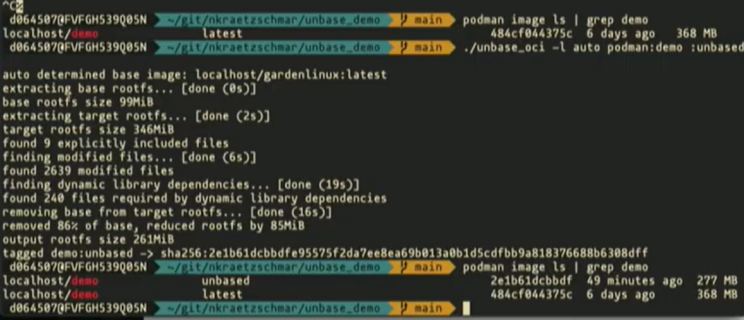
Measure the result layer by layer with dive, which shows what each layer adds and how much space is wasted:
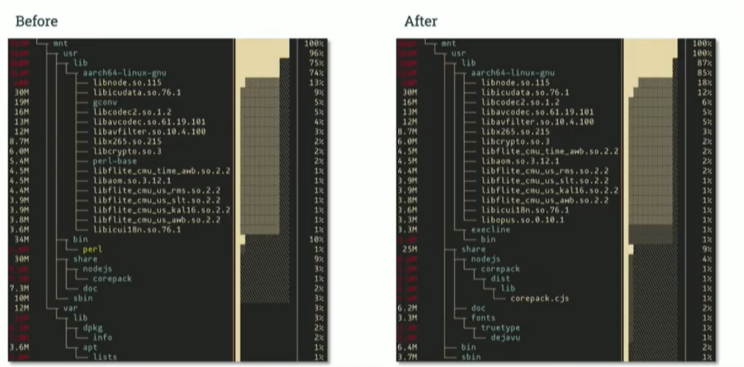
dpkg, apt lists), perl-base and unused tooling are gone; the application’s shared libraries remain.# Fail the pipeline if the image wastes space across layers
dive --ci \
--lowestEfficiency=0.95 \
--highestUserWastedPercent=0.10 \
registry.example/web:1.8-slim04A supply chain you can verify
A hardened image only stays hardened if the pipeline that produces it is controlled. Three practices make the chain verifiable end to end.
builder stage uses a full SDK to compile; the final stage starts from a minimal base and copies only the artifact. Build tools never ship.COPY, ARG or ENV. See the layered-model guide.# Sign by digest, never by tag
cosign sign --key cosign.key registry.example/web@sha256:3f1c9e0b7a2d4c6e8f00112233445566778899aabbccddeeff00112233445566
# Verify before deploy (also enforced at admission below)
cosign verify --key cosign.pub registry.example/web@sha256:3f1c9e0b7a2d4c6e8f00112233445566778899aabbccddeeff00112233445566apiVersion: kyverno.io/v1
kind: ClusterPolicy
metadata:
name: verify-signed-images
spec:
validationFailureAction: Enforce # fail closed
webhookTimeoutSeconds: 30
rules:
- name: require-cosign-signature
match:
any: [{ resources: { kinds: ["Pod"] } }]
verifyImages:
- imageReferences: ["registry.example/*"]
mutateDigest: true # pin the verified digest into the Pod
attestors:
- entries:
- keys:
publicKeys: |-
-----BEGIN PUBLIC KEY-----
<cosign.pub contents>
-----END PUBLIC KEY-----The secure Dockerfile checklist
Harden the image in the Dockerfile itself. Every line below maps to one rule: run as a non-root user, pin every version, clean caches in the same layer that created them, and prefer COPY over ADD, whose remote-URL download and automatic archive extraction make the build less transparent.
# Pin the base: never :latest
FROM python:3.11-slim-bookworm

# Create a system user and group for the app
RUN groupadd --system app && useradd --system --gid app --no-create-home app

# Install OS packages and clean the cache in the SAME layer
RUN apt-get update \
 && apt-get install -y --no-install-recommends libpq5=15.* \
 && apt-get clean \
 && rm -rf /var/lib/apt/lists/*

WORKDIR /app
# Pin application dependencies exactly (fastapi==0.104.1 in requirements.txt)
COPY requirements.txt .
RUN pip install --no-cache-dir -r requirements.txt

# COPY, not ADD; hand ownership to the app user
COPY --chown=app:app . .

# Drop root before the process starts
USER app
CMD ["python", "-m", "uvicorn", "main:app", "--host", "0.0.0.0", "--port", "8080"]05Why scanners disagree — and which findings are noise
Run three scanners against the same image and you get three different answers. Chainguard’s analysis of common base images makes the spread concrete:
| Image | Scanner | Critical | High | Medium | Low | Unknown |
|---|---|---|---|---|---|---|
node:17 | Trivy | 33 | 122 | 183 | 503 | 16 |
| Grype | 33 | 112 | 163 | 485 | 68 | |
| Docker Scan / Snyk | 13 | 26 | 38 | 138 | 0 | |
debian:11.2 | Trivy | 6 | 4 | 5 | 56 | 0 |
| Grype | 6 | 2 | 2 | 55 | 6 | |
| Docker Scan / Snyk | 3 | 2 | 1 | 37 | 0 | |
redhat/ubi8:8.5 | Trivy | 0 | 0 | 59 | 39 | 0 |
| Grype | 0 | 2 | 65 | 40 | 4 | |
| Docker Scan / Snyk | 0 | 0 | 57 | 46 | 0 | |
ubuntu:20.04 | Trivy | 0 | 0 | 27 | 31 | 0 |
| Grype | 0 | 0 | 25 | 31 | 0 | |
| Docker Scan / Snyk | 0 | 0 | 5 | 23 | 0 | |
alpine:3.15.0 | Trivy | 0 | 0 | 0 | 0 | 0 |
| Grype | 0 | 0 | 0 | 0 | 0 | |
| Docker Scan / Snyk | 0 | 0 | 0 | 0 | 0 |
Source: Chainguard analysis of base images. The tags are dated (node:17, debian:11.2); read the table for the spread between scanners, not for current counts.
The same node:17 image reports 122, 112 or 26 high-severity findings depending on the tool. Most of that gap is not missed vulnerabilities — it is disagreement about which findings are real. Four sources of false positives account for most of it:
not_affected statement rather than silently ignoring it.maven that lived only in the builder stage and never reached the final image. Scan the image you ship, not the build context.Kernel CVEs belong to the node
Because kernel exposure is a node property, the node operating system deserves the same minimisation as the image. Scanning several node OS images with the same tool shows the scale of the difference:
| Operating system | Critical CVEs | High CVEs | Total not-fixed CVEs |
|---|---|---|---|
| Talos Linux 1.11.0 | 0 | 29 | 6 |
| Flatcar 4230.2.2 | 27 | 75 | 2 |
| Ubuntu 22.04.05 | 280 | 1943 | 5653 |
| Rocky Linux 10 | 0 | 381 | 10808 |
Results from sudo grype dir:/ on each OS. Talos Linux has no shell, so its CVEs were gathered from its SBOM files as described in the Talos documentation. Source: the Talos Linux project’s published comparison.
img="registry.example/web:1.8-slim"

# Distro-aware scan of the final image only; fail on fixable high/critical
grype "$img" --only-fixed --fail-on high

# Apply recorded not_affected decisions (OpenVEX) so reviewed noise stays suppressed
trivy image --vex ./vex/web.openvex.json --severity HIGH,CRITICAL --exit-code 1 "$img"

# Node OS: scan the host filesystem, not the image, for kernel and OS packages
sudo grype dir:/ --only-fixed06Confine the running container
A secure image is necessary but not sufficient. The runtime decides what a compromised process can do.
Never privileged; drop every capability you do not need
A container with securityContext.privileged: true is effectively root on the host and bypasses kernel permission checks. The flag bundles the container with the host rather than isolating it; it exists for administrative workloads that manipulate the network stack or hardware. Avoid it and grant specific capabilities instead.
Linux splits root’s privileges into distinct capabilities that can be enabled and disabled independently. Contrary to what most teams expect, leaving securityContext.capabilities empty does not mean “no capabilities”: the runtime applies its default set, which is far more generous than most processes need. A simple web application does not need CAP_SYS_ADMIN (which allows mounting filesystems) or CAP_NET_ADMIN (which allows network configuration changes). Drop everything and add back only what the application requires — typically CAP_NET_BIND_SERVICE to bind a port below 1024 — and a compromise yields far less.
Finding the minimal set is an allow-list exercise: start with no capabilities and add them one use case at a time. Running under SELinux in permissive mode and reading the audit log, or tracing capability checks while the test suite runs, shows exactly which capabilities the application exercises.
apiVersion: v1
kind: Pod
metadata:
  name: web-app
spec:
  securityContext:
    runAsNonRoot: true
    runAsUser: 10001
    seccompProfile:
      type: RuntimeDefault          # filters the most dangerous syscalls
  containers:
    - name: app
      image: registry.example/web:1.8-slim
      securityContext:
        privileged: false
        allowPrivilegeEscalation: false
        readOnlyRootFilesystem: true  # nothing can be written to the image filesystem
        capabilities:
          drop: ["ALL"]               # remove the runtime's default set
          add: ["NET_BIND_SERVICE"]   # add back only what the app needs
      volumeMounts:
        - name: tmp
          mountPath: /tmp             # writable scratch space on a volume, not the rootfs
  volumes:
    - name: tmp
emptyDir: {}Secrets from a secrets manager, not from the image
The Container Storage Interface (CSI) is the Kubernetes API for exposing storage systems to containers; it lets third-party providers plug new storage types in as volumes. The Secrets Store CSI Driver, developed and maintained by the Kubernetes community, uses that interface to read secrets from a centralised secrets management system (SMS) — HashiCorp Vault, AWS Secrets Manager, Azure Key Vault, Google Secret Manager — and mount them into the Pod as a regular volume. The secret never exists in the image and need not exist as a Kubernetes Secret object at all.
apiVersion: secrets-store.csi.x-k8s.io/v1
kind: SecretProviderClass
metadata:
  name: web-db-creds
spec:
  provider: vault
  parameters:
    vaultAddress: "https://vault.internal:8200"
    roleName: "web"                         # Vault Kubernetes-auth role
    objects: |
      - objectName: "db-password"
        secretPath: "secret/data/web/db"
        secretKey: "password"
---
# In the Pod spec
volumes:
  - name: secrets
    csi:
      driver: secrets-store.csi.k8s.io
      readOnly: true
      volumeAttributes:
        secretProviderClass: web-db-creds
# ...and in the container
volumeMounts:
  - name: secrets
    mountPath: /mnt/secrets                 # the app reads /mnt/secrets/db-password
    readOnly: true
Least privilege on the network, too
Capabilities limit what a process can do on its node; a service mesh limits whom it can talk to. With Istio, an AuthorizationPolicy expresses exactly which callers may reach which endpoints. The classic example lets the monitoring stack scrape metrics and nothing else:
apiVersion: security.istio.io/v1
kind: AuthorizationPolicy
metadata:
  name: prometheus-scraper
  namespace: istio-system       # root namespace: applies to matching Pods in all namespaces
spec:
  selector:
    matchLabels:
      has-metrics: "true"       # only Pods that expose metrics
  action: ALLOW
  rules:
    - from:
        - source:
            namespaces: ["prometheus"]   # callers from the prometheus namespace...
      to:
        - operation:
            methods: ["GET"]             # ...may only GET
            paths: ["/metrics/*"]        # ...the metrics endpoints
Adapted from Kubernetes Patterns, 2nd ed., Example 24-6. security.istio.io/v1 is the current API; older material uses v1beta1. Remember that an ALLOW policy denies all other traffic to the selected workloads, so add a policy for application traffic before rolling this out.
When a process boundary is not enough: unikernels with urunc
urunc is a specialised OCI runtime, similar to runc, designed to run unikernels instead of standard Linux containers. A unikernel is a single-purpose machine image built by compiling the application together with only the bare minimum of operating-system libraries it needs. The result is tiny, fast to boot, and isolated by a hypervisor rather than by kernel namespaces: urunc starts and manages each unikernel as a lightweight virtual machine, using monitors such as QEMU/KVM, Firecracker or Solo5.
This changes the threat model in section 08: a kernel exploit inside a unikernel attacks the unikernel’s own library OS, not the shared host kernel. The cost is that the workload must be built as a unikernel, which suits focused network services far better than general applications.
apiVersion: node.k8s.io/v1
kind: RuntimeClass
metadata:
  name: urunc
handler: urunc              # containerd runtime handler configured on the node
---
apiVersion: v1
kind: Pod
metadata:
  name: edge-proxy
spec:
  runtimeClassName: urunc
  containers:
    - name: proxy
image: registry.example/edge-proxy-unikernel:2.107Triaging runtime alerts
Runtime detection fires constantly; the skill is separating an attack from routine operations. For each alert, ask the context question first, then look for the signals that make it a true positive:
| Alert | What it means | Question to ask | True-positive signals |
|---|---|---|---|
| Interactive execution | Someone ran kubectl exec into a container. | Was this planned and authorised for debugging or maintenance? | The Kubernetes audit log shows an unknown user or an external source IP; no matching support ticket exists. |
| eBPF program loaded | A process loaded an eBPF program into the kernel. | Is the process a known monitoring or networking agent (Falco, Cilium)? | The loader is your application binary (nginx, gunicorn); the action deviates from the learned baseline. |
| Code executed on the fly | An interpreter ran a command string (python -c). | Is it part of a legitimate init script? | The parent is a web server (command injection); the string is obfuscated or opens a network socket. |
| User or group tools | useradd or groupadd ran. | Why would this container create users at runtime? | Almost always a true positive in production: an attempt to create a backdoor account. |
| etcd connection | A process connected to the etcd database. | Does this Pod belong to the control plane? | Any connection not from kube-apiserver is critical. |
| Fileless executable | A process wrote code to memory and marked it executable. | Is this a JIT compiler (Java, .NET)? | The process is not a known JIT; the memory contents match a malware signature (YARA). |
| Language runtime spawns a shell | python or java executed /bin/sh. | Does the app legitimately call external shell commands? | Almost always a true positive: a successful command-injection exploit. |
| Hidden file executed | A process ran a file whose name starts with a dot (/.x). | Is it a known configuration file, or new? | The file was written moments before execution, in a writable path such as /tmp. |
Two of these rules are cheap to deploy and rarely noisy in production. The Falco rule catches a language runtime spawning a shell; the audit query lists every exec for comparison against change tickets.
- rule: Language Runtime Spawned Shell
  desc: A Python, Java, Node or PHP process started a shell inside a container
  condition: >
    spawned_process and container
    and proc.name in (sh, bash, dash, ash)
    and proc.pname in (python, python3, java, node, php, php-fpm)
  output: >
    Shell spawned by language runtime
    (parent=%proc.pname cmd=%proc.cmdline container=%container.name
     image=%container.image.repository)
  priority: CRITICAL
tags: [container, shell, mitre_execution, T1059]# Requires an audit policy that records pods/exec at Metadata level or higher
jq -c 'select(.objectRef.subresource == "exec")
| {ts: .requestReceivedTimestamp, user: .user.username, ip: .sourceIPs,
ns: .objectRef.namespace, pod: .objectRef.name}' \
/var/log/kubernetes/audit/audit.log08The threats this playbook is built for
Three widely exploited vulnerabilities show why every layer above matters — and, just as important, where each one is fixed. Rebuilding an image fixes none of the last two.
| CVE | Component & class | How it is used | Where it is fixed |
|---|---|---|---|
| CVE-2024-2961 | glibc iconv heap buffer overflow — supply chain | Crafted text reaches an application’s character-set conversion (notably PHP), turning the overflow into remote code execution inside the container. | Image: rebuild on a patched glibc. Images without glibc charset modules are not exposed. |
| CVE-2024-21626 | runc “Leaky Vessels” file-descriptor leak — container escape | A trojanised image’s entrypoint abuses a leaked handle during startup to read and write the host filesystem. | Node runtime: runc 1.1.12 or later on every node. |
| CVE-2024-1086 | Linux kernel nf_tables use-after-free — privilege escalation | From a low-privilege shell in a container, a local exploit corrupts kernel memory and gains root on the node. Listed in CISA KEV. | Node kernel: patched kernel. Seccomp profiles that deny user-namespace creation narrow the usual path. |
iconv bug (CVE-2024-2961) in a full base image. Blocked by: patched or glibc-free base.Use the checklist as the release gate for a workload. It scores itself; anything short of full coverage is an open item.
0 controls verified
Sources
- GoogleContainerTools/distroless
- slimtoolkit/slim
- gardenlinux/unbase_oci
- wagoodman/dive
- nubificus/urunc
- Secrets Store CSI Driver documentation
- Istio AuthorizationPolicy reference
- Kubernetes: configure a security context
- Sigstore Cosign documentation
- CVE-2024-2961 · CVE-2024-21626 · CVE-2024-1086
- Bilgin Ibryam and Roland Huß, Kubernetes Patterns, 2nd ed. (O’Reilly): process containment, network segmentation and secure configuration chapters
- Related: Docker’s layered model — secrets, multi-stage builds and capabilities
Every byte you ship is a byte you defend. The fastest security win in containers is not a new tool; it is deleting what the workload never needed — the shell, the package manager, the capabilities, the network paths. Scanners get quieter and honest at the same time, and the runtime alerts that remain start to mean something.
Then be clear about where each fix lives. The image owns its libraries. The node owns its kernel and runtime. The platform owns admission, secrets and the network. A team that patches the wrong layer is busy and still exposed.
See where images, identities and runtime privileges meet
K8SEC Agent maps workloads, images, service accounts and security contexts read-only, so you can find the privileged, capability-heavy or unsigned workloads first. It does not collect Secret values, exec into pods or mutate resources.
Explore KAOS methodology